
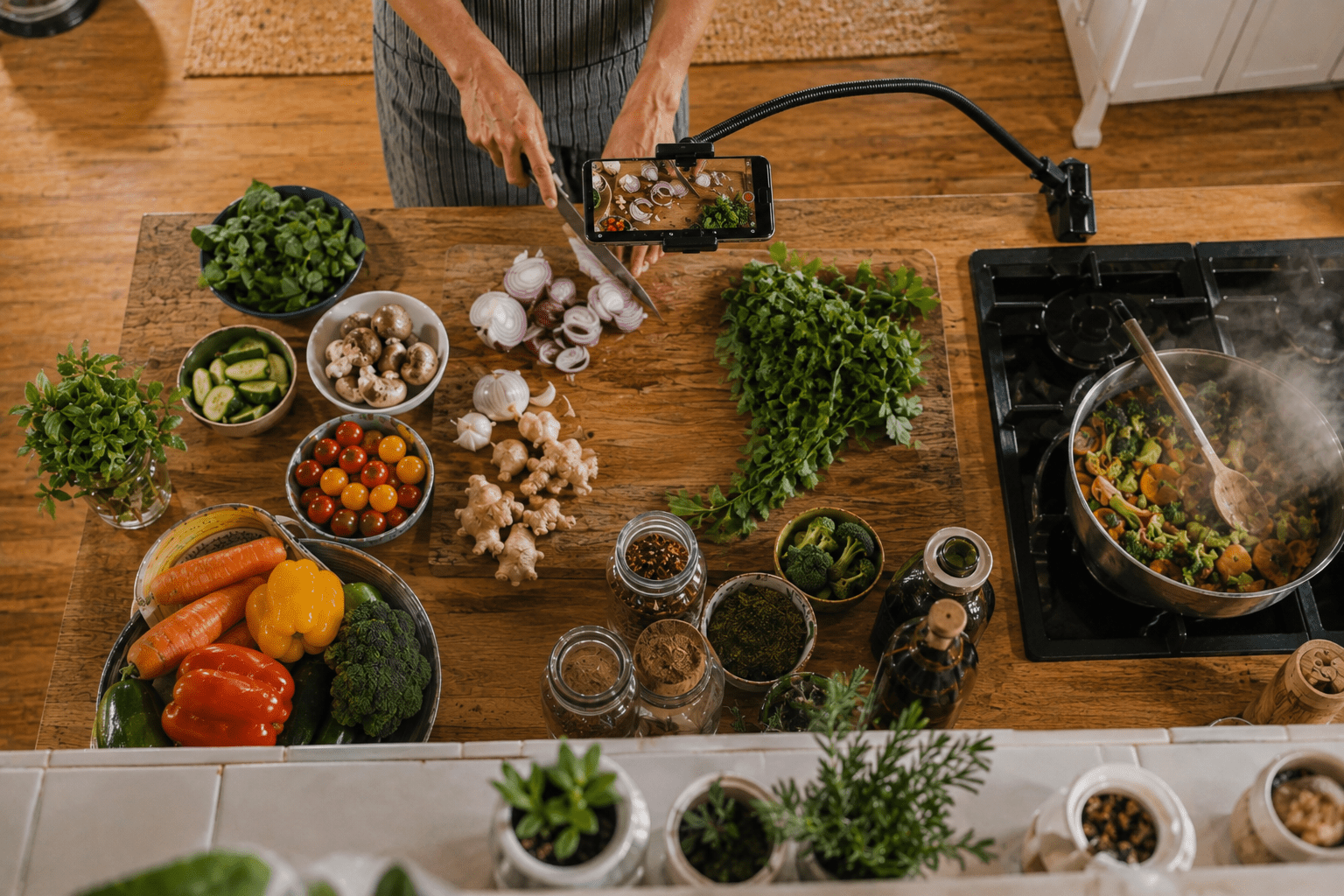
A good cooking video doesn't need to look like it was filmed in a professional studio.
In fact, some of the most enjoyable recipe videos feel exactly the opposite. You can hear ingredients hitting the pan, see flour scattered across the bench and follow the cooking process from an angle that feels almost like you're standing in the kitchen.
A smartphone is more than capable of creating that kind of video. The challenge is knowing where to put it.
From overhead preparation shots to close-ups of the finished dish, a few simple changes to your camera position, lighting and sound can make cooking videos much easier to watch.
Don't Film the Entire Recipe From One Angle
Set up a phone in front of the kitchen bench, press record and film the entire recipe.
It's easy, but the result can quickly become repetitive.
Instead, think of the recipe as a collection of small moments.
- Ingredients being placed on the bench
- Vegetables being chopped
- Sauce being poured
- Food hitting a hot pan
- Steam rising during cooking
- The final dish being served
You don't need a different camera for each shot. Simply changing the position of your smartphone gives the video much more variety.

Overhead Shots Are Perfect for Preparation
There's a reason overhead filming is so common in cooking videos.
It gives viewers a clear view of your hands, ingredients and work surface without your body blocking the action.
This works particularly well for chopping, mixing, decorating, baking and assembling dishes.
Instead of balancing your phone on shelves or trying to build a temporary stand from objects around the kitchen, an adjustable arm can position the phone directly above the work surface while keeping the bench clear.
View the ROODTUO LCH3 Flexible Arm Clamp

Use a Stable Front Angle for Talking and Demonstrations
Not every part of a cooking video needs to be overhead.
If you're introducing the recipe, explaining a technique or showing the finished dish, a front-facing angle usually feels more natural.
A tripod or stable stand allows you to frame the kitchen once and then concentrate on cooking instead of repeatedly adjusting the phone.
Position the camera roughly around chest or eye level depending on whether you want the viewer to see more of you or more of the work surface.
Explore ROODTUO Tripods & Stands

Secure the Phone Properly
Kitchens aren't the place for a loosely mounted smartphone.
You're working around liquids, hot surfaces and constant movement, so make sure the phone is securely attached before you begin.
A dedicated phone clamp also makes it easier to switch between portrait video for Reels or TikTok and landscape video for longer-form content.
For setups where you may also want to attach a small light or microphone receiver, a clamp with additional mounting points can be particularly useful.
View the ROODTUO PCJ-S Dual Cold Shoe Rotating Phone Clip
Kitchen Lighting Can Be More Difficult Than It Looks
A kitchen may look bright to your eyes while still being difficult for a smartphone camera.
Ceiling lights can create strong shadows beneath your hands, while mixed daylight and warm indoor lighting can make food colours look unnatural.
During the day, start by using window light whenever possible.
If one side of the food is noticeably darker, a compact fill light can help balance the scene rather than simply making everything brighter.
Pay particular attention to shiny plates, stainless steel pans and sauces. Moving the light slightly to one side can often reduce distracting reflections.

Get Closer When Something Interesting Happens
Some cooking moments deserve more than a wide shot.
The bubbles forming around food in a hot pan, melted cheese stretching, a knife cutting through a crisp crust or sauce being poured over the final dish can become some of the strongest shots in the entire video.
Move the phone closer for these moments rather than relying heavily on digital zoom.
Keep the shot short. Two or three seconds is often enough.

Sound Can Make Food Feel More Real
Cooking has its own soundtrack.
The sound of chopping, sizzling, cracking, pouring and stirring can make a simple video surprisingly immersive.
Don't automatically remove all of the original audio when editing.
If you're explaining the recipe while cooking, however, distance becomes important. A phone positioned several metres away may capture the exhaust fan, running water and the pan more clearly than your voice.
A wireless microphone allows the camera to stay where the shot looks best while keeping spoken instructions closer and clearer.
Explore ROODTUO Wireless Microphones
Steam Is Great — Until It Covers Your Lens
Steam can look fantastic on video, particularly when it's backlit.
But don't position your phone directly above a boiling pot or pan simply to capture it.
Apart from exposing the device to unnecessary heat and moisture, condensation can quickly fog the camera lens.
Film steam from a safe side angle instead. If there's a window or light source behind it, the steam will usually become much more visible on camera.

Film the Finished Dish Before Everyone Starts Eating
This sounds obvious until dinner is ready and everyone is hungry.
Before the plate reaches the table, take ten seconds to capture the result.
Try one wider shot showing the whole plate, followed by one close-up focusing on texture or detail.
You can also record a simple movement: cutting into the dish, lifting a serving, adding the final garnish or pouring the sauce.
Those few seconds give your video a natural ending and show viewers what the entire process was leading towards.
A Simple Cooking Video Shot List
- Ingredients before cooking
- One overhead preparation shot
- One front-facing explanation
- Chopping or mixing close-up
- Food entering the pan
- Sizzling or cooking detail
- Steam or movement
- Plating the dish
- Final wide shot
- Final close-up
Final Thoughts
The best cooking videos aren't necessarily the ones with the most equipment or complicated camera movements.
They simply make it easy for the viewer to understand what's happening while still showing the texture, movement and atmosphere that make food interesting.
Start with a stable phone position. Add an overhead angle when it genuinely helps. Get closer for the important details and don't forget the natural sounds of the kitchen.
With a smartphone and a few thoughtfully chosen shots, an ordinary recipe can become a video that's genuinely enjoyable to watch.
Share:
What to Pack for an Australian Snow Trip: A Smartphone Creator’s Guide
How to Film Your Child’s Sports Game With a Smartphone